

Archive (Archief)
The Archief (archive) brings together the archived records of all modules: interventions, projects, installations, customers, sites, items, contracts… Archiving removes a record from the work lists, without deleting anything: each archived record still opens on its own page, with its history, its documents and its links.
| Menu | Inzichten › Archief |
| Who | Anyone who can view at least one of the modules: they only see the tabs of those modules. Restore: the person who can archive in that module (table at the bottom of the page). |
| Prerequisites | None. The archive fills up when someone archives a record from its module. |
Archive a record
Section titled “Archive a record”You archive from the module itself (the list or the record’s page), not from the Archief. Example with project tasks:
-
In the module’s list, tick one or more records (or open a record’s ⋯ menu).
-
Click Archiveren (archive).
-
If you wish, enter a Reden (optioneel) (reason, optional), then click Archiveren.
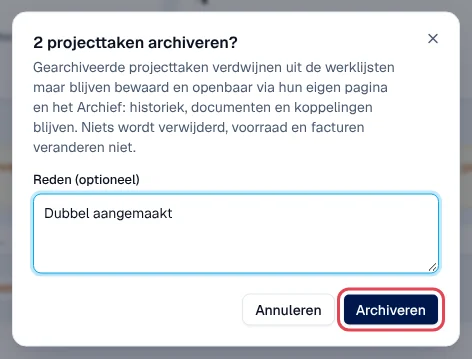
Result: a message confirms, for example “2 projecttaken gearchiveerd”. The confirmation window also says what changes in the module (here: the task leaves the work lists; stock and invoices do not change).
For interventions, the Service Suite first checks the conditions: the window shows how many “komen in aanmerking” (are eligible) and lists the others under Niet in aanmerking (not eligible), with the reason. Each module keeps its own rules: for example, a site with open interventions cannot be archived.
Find an archived record
Section titled “Find an archived record”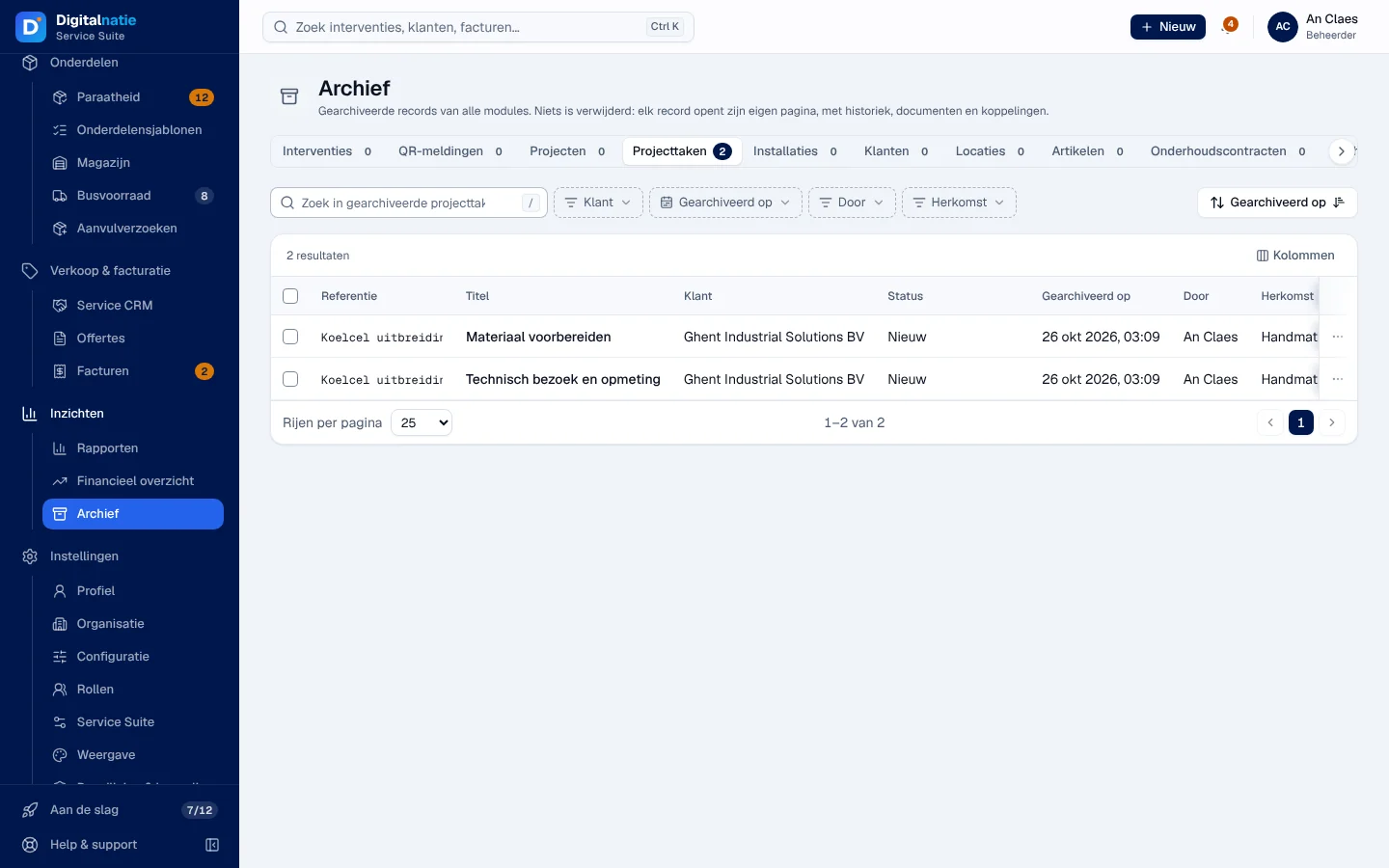
-
Open Inzichten › Archief.
-
Choose the module’s tab: Interventies, QR-meldingen (QR reports), Projecten, Projecttaken (project tasks), Installaties, Klanten (customers), Locaties (sites), Artikelen, Onderhoudscontracten (maintenance contracts) or Techniekers. The number shows how many records are archived.
-
Search or filter by Klant (customer), Gearchiveerd op (archived on), Door (by whom) and Herkomst (origin: Handmatig, manual, or Automatisch, automatic).
-
Click a row or Openen (open) to open the record’s page.
The Referentie, Titel, Klant, Status, Gearchiveerd op, Door, Herkomst and Reden columns show what was entered when archiving. When the author or the date is not known (archived elsewhere, for example), the column shows “Niet beschikbaar” (not available).
On its own page, an archived record shows the Gearchiveerd (archived) banner, with who, when and why.
Quotes and invoices are not archived: they remain in Quotes and Invoices.
Restore a record (Terugzetten)
Section titled “Restore a record (Terugzetten)”-
In the module’s tab, open the row’s ⋯ menu and choose Terugzetten (restore). For several records, tick them and use Terugzetten in the selection bar. The Gearchiveerd banner on the record’s page also offers Terugzetten.
-
If you wish, enter a Reden (optioneel), then click Terugzetten.
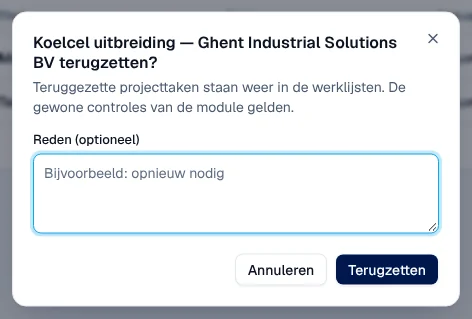
Result: “1 projecttaak teruggezet” (restored). The record returns to its module’s work lists; the module’s usual checks apply again.
The archiving rule for interventions (Archiefbeleid)
Section titled “The archiving rule for interventions (Archiefbeleid)”In the Interventies tab, the Archiefbeleid voor interventies (archiving policy for interventions) panel describes an automatic rule: archive interventions that have been truly completed for 90 days, with no open follow-up, no open or missing invoice, no open task and no stock or parts work in progress; 25 at most per run; an intervention restored manually is no longer archived by the rule.

Rights
Section titled “Rights”The table shows the supplied role templates (see Roles and permissions); your administrator can adapt them (see Users, roles and permissions).
| Action | Admin | Manager | Planner | Accounting | Warehouse | Sales | Read |
|---|---|---|---|---|---|---|---|
| View a module’s tab | ✓ ¹ | ✓ ¹ | ✓ ¹ | ✓ ¹ | ✓ ¹ | ✓ ¹ | ✓ ¹ |
| Archive / restore: interventions, customers, sites | ✓ | ✓ | ✓ | — | — | — | — |
| Archive / restore: installations, maintenance contracts, technicians | ✓ | ✓ | — | — | — | — | — |
| Archive / restore: items | ✓ | — | — | — | ✓ ² | — | — |
| Archive / restore: projects, project tasks | ✓ | ✓ | — | — | — | — | — |
| Archive / restore: QR reports | ✓ | ✓ | — | — | — | — | — |
| Archiefbeleid: view the panel and the preview | ✓ | ✓ | — | — | — | — | — |
¹ Only the tabs of the modules the role can view. ² Warehouse Manager only.
Without any module it can view, the page says “Geen archief voor uw rol” (no archive for your role). Roles are set in Users, roles and permissions.
Current limits
Section titled “Current limits”- The automatic archiving rule for interventions is switched off for everyone (see above).
- Quotes and invoices are not archived.