From missing parts to the van
A first-time fix starts with the right parts in the van. This journey shows who does what, and when the stock really moves.
| Step | Who | Screen | Does stock move? |
|---|---|---|---|
| 1. Spot the shortage | planner, manager | Onderdelen › Paraatheid | no |
| 2. Request | planner; or the technician in their app | Aanvulling aanvragen; Bestelwagen | no: it is a request |
| 3. Approve | manager, administrator | Busvoorraad › Aanvulverzoeken | no: a transfer is reserved |
| 4. Prepare and validate | warehouse | Magazijn › Overboekingen | yes: from the warehouse to the van |
| 5. Check | planner | Paraatheid › Opnieuw beoordelen | — |
-
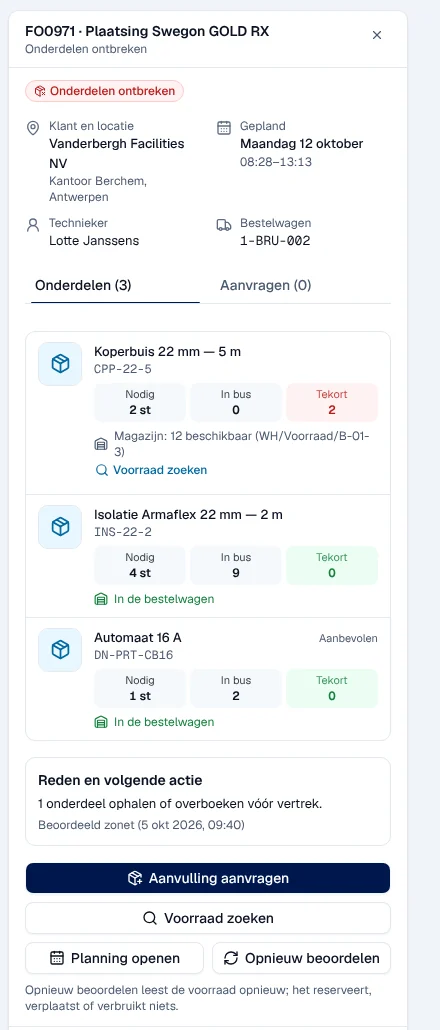
Spot the shortage. Paraatheid (parts readiness) ranks upcoming interventions according to whether their parts are ready or not. Open an intervention marked Onderdelen ontbreken (parts missing) to see, part by part, what is missing from the van. Guide: Parts readiness.
-
Request the part. From this detail, Aanvulling aanvragen (request replenishment) creates a request for the van. The technician can also do it themselves in their app, Bestelwagen tab: see Parts and van.
-
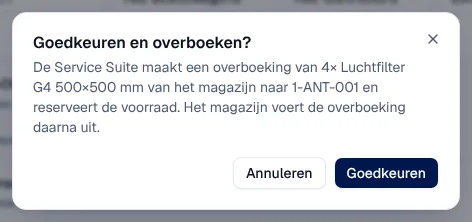
Approve. In Busvoorraad › Aanvulverzoeken, the person who manages the vans clicks Goedkeuren (approve). Service Suite prepares a transfer from the warehouse to the van and reserves the part. Guide: Vans and replenishment requests.
-
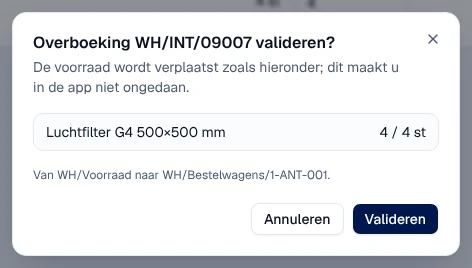
Prepare and validate. The warehouse prepares the part and validates the transfer in Magazijn › Overboekingen. Only at this moment does the stock move from the warehouse to the van. Guide: The warehouse.
-
Check. The readiness status does not recalculate by itself: click Opnieuw beoordelen (reassess) in Paraatheid. The intervention changes to Klaar (ready) if everything is now in the van.